PostgreSQL Vector Search with pgvector: A Practical Tutorial
Implement semantic search with pgvector in PostgreSQL: embeddings, similarity metrics, IVFFlat vs HNSW indexes, and a complete Bun/TypeScript example.
- Posts
- 11 minutes read
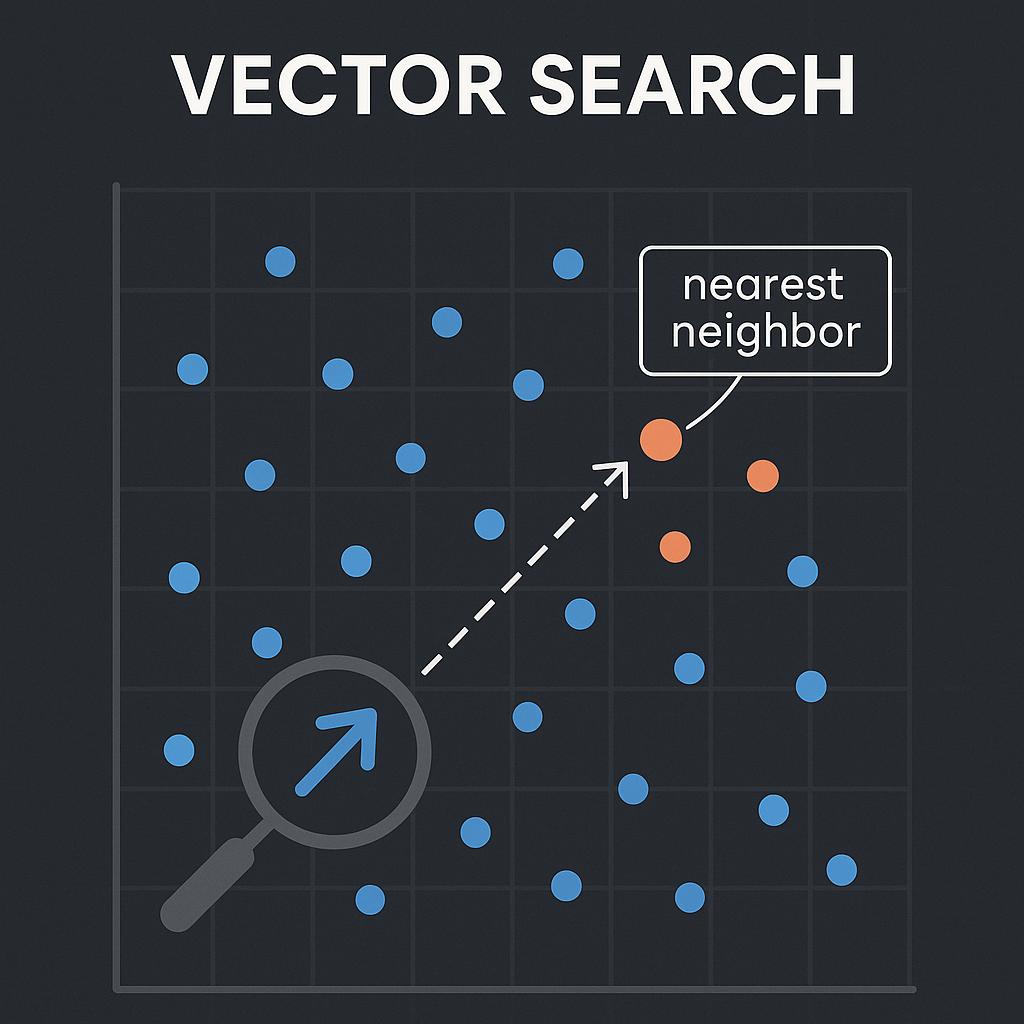
What is Vector Search?
Vector search finds similar points in multidimensional space. It converts data such as text, images, and audio into mathematical vectors, then measures the distances between them.
Core Concept: Embedding
Embeddings are normalized unit vectors typically generated by AI models, with each value ranging between -1 and 1. For example, OpenAI's text-embedding-3-small model converts a piece of text into a vector array of 1536 dimensions. These vectors capture semantic information, making "Taipei is the capital" and "Taiwan's administrative center" close together in vector space.
Common methods for vector search include:
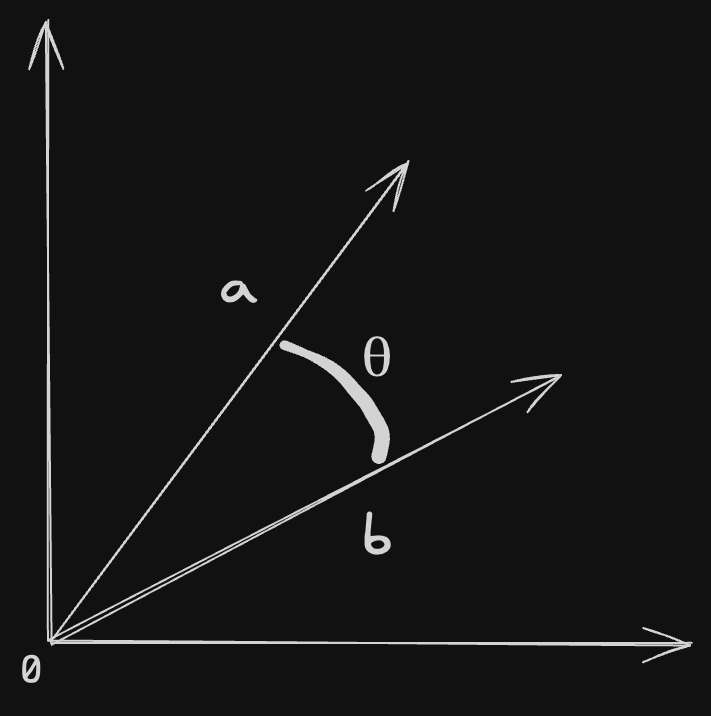
- Cosine Similarity: Measures the directional similarity between two vectors, ignoring vector magnitude. This makes it particularly suitable for text semantic search, as we care about the relative frequency of words rather than absolute occurrence counts.
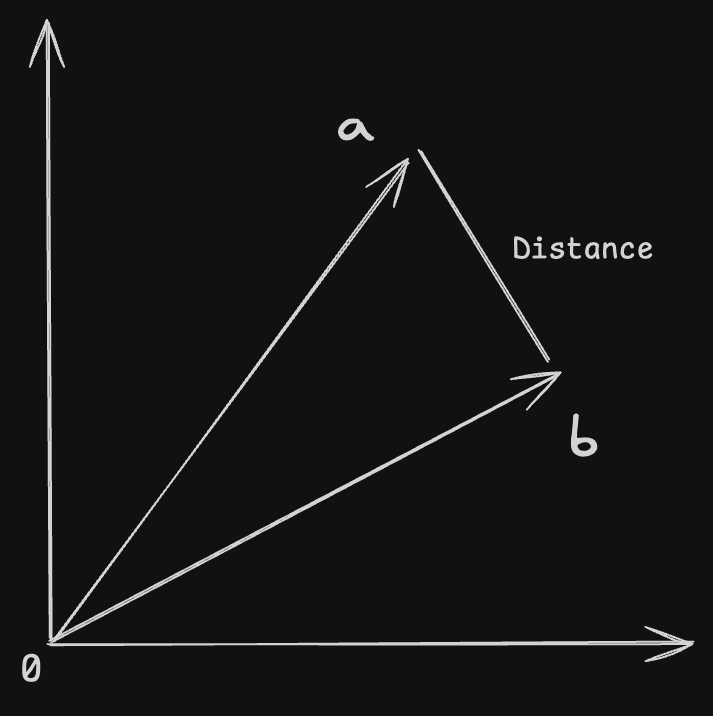
- Euclidean Distance: Measures the straight-line distance between two points in multidimensional space, which is our commonly understood geometric distance. Smaller values indicate closer vectors, with 0 representing identical vectors. Suitable for applications requiring consideration of absolute vector magnitude.
Cosine Similarity
Cosine similarity measures how closely two vectors point in the same direction. milvus
-
Cosine Similarity Formula
- Where represents the dot product of two vectors.
- and are the norms (lengths) of vectors and , respectively.
-
Cosine Distance Formula
Cosine distance is the complement of cosine similarity, used to measure the distance between two vectors:
- Range: -1 (completely opposite) to 1 (completely identical), 0 indicates orthogonal (no correlation).
Use Cases: Text similarity comparison, recommendation systems, RAG (Retrieval-Augmented Generation).
Euclidean Distance
Euclidean distance measures the straight-line distance between two points in multidimensional space. Use it when the absolute magnitude of the vectors matters.
-
Euclidean Distance Formula
- Where and are the components of vectors and , respectively.
- is the vector dimension.
Range: 0 to ∞, smaller values indicate greater similarity. Use Cases: Image feature matching, numerical data comparison, anomaly detection.
Why Choose Postgres for Vector Search?
pgvector is a PostgreSQL extension. It fits projects that want to keep vector search alongside their existing relational data:
| Advantage | Description |
|---|---|
| Seamless Integration | Integrates seamlessly with existing relational databases without introducing new database systems |
| Native SQL Support | Uses familiar SQL syntax for vector queries with low learning curve |
| Hybrid Queries | Supports both vector similarity search and traditional SQL conditional filtering |
| Mature Ecosystem | Built on PostgreSQL's stability and rich toolchain |
| Cost-Effective | Open-source and free, no additional vector database subscription fees |
pgvector Limitations and Suitable Scenarios
Index Dimension Limit: pgvector's indexing functionality supports up to 2000-dimensional vectors. This is due to PostgreSQL's default page size (8KB) limitation. While higher-dimensional vectors can be stored, they cannot be indexed, leading to significant query performance degradation.
Performance: In ultra-large-scale (billion-level) vector retrieval scenarios, performance is not as good as dedicated vector databases like Milvus.
Solutions for the 2000-Dimension Limit:
If you need to use vector models exceeding 2000 dimensions (such as OpenAI's text-embedding-3-large), consider these solutions:
- Matryoshka Embeddings (Recommended): OpenAI's text-embedding-3 series supports specifying lower dimensions (such as 1536, 1024, or 512) directly in API calls, requiring no additional dimensionality reduction with minimal accuracy loss.
- Dimensionality Reduction: Use PCA (Principal Component Analysis) to reduce vectors from 3072 dimensions to below 2000.
- Binary Quantization: pgvector supports handling higher-dimensional data through binary quantization, but at the cost of some accuracy.
Optimal Use Cases:
Small to Medium Projects: Vector quantities within tens of millions, without extreme latency requirements. Hybrid Query Needs: Requires combining structured data (like user IDs, timestamps) with vector similarity for complex queries. Rapid Prototype Development: Teams already familiar with PostgreSQL wanting to quickly validate AI functionality. Budget Constraints: Cannot afford the operational costs of dedicated vector databases.
Implementing Vector Search in Postgres
-
Install pgvector extension
CREATE EXTENSION IF NOT EXISTS vector;You can directly use the pgvector image, then execute this method after startup.
-
Create table with vector column
Choose an OpenAI Embedding model based on your needs:
| Model | Dimensions | Adjustable | Use Case |
|---|---|---|---|
| text-embedding-3-small | 1536 (adjustable to 512) | Yes | General text retrieval, best cost-effectiveness |
| text-embedding-3-large | 3072 (adjustable to 256) | Yes | High-precision needs, complex semantics |
| text-embedding-ada-002 | 1536 | No | Legacy model, not recommended for new projects |
Important Note: text-embedding-ada-002 was marked as deprecated in January 2025 and is expected to be officially retired after June 2025. New projects should directly use text-embedding-3-small or text-embedding-3-large for higher accuracy.
Note that pgvector's indexing functionality supports up to 2000 dimensions. If using text-embedding-3-large's default 3072 dimensions, it's recommended to adjust to 1536 or lower via the API's dimensions parameter.
CREATE TABLE items (
    id serial PRIMARY KEY,
    embedding vector(1536) -- Assuming each vector has 1536 dimensions
);-
Insert vector data
INSERT INTO items (embedding) VALUES ('[0.1, 0.2, ..., 0.3]'), ('[0.4, 0.5, ..., 0.6]'), ...; -
Execute vector search
Use cosine similarity to query the most similar vectors:
SELECT id, embedding
FROM items
ORDER BY embedding <=> '[query_vector]' -- pgvector's built-in cosine similarity operator
LIMIT 10;
For Euclidean distance calculations, you can use
<->instead
Creating Indexes
pgvector supports two index types:
- IVFFlat (Inverted File Index):
- Divides vector space into multiple clusters (lists), searching only partial clusters
- Suitable for medium-scale data (millions)
- Fast build speed, low memory usage
CREATE INDEX ON documents
USING ivfflat (embedding vector_cosine_ops)
WITH (lists = 100);- HNSW (Hierarchical Navigable Small World):
- Graph-based approximate nearest neighbor algorithm with extremely fast query speed
- Suitable for low-latency real-time applications
- Higher memory usage but better recall
CREATE INDEX ON documents
USING hnsw (embedding vector_cosine_ops)
WITH (m = 16, ef_construction = 64);
Index performance comparison (based on 1 million vector benchmark): neon
| Metric | IVFFlat | HNSW |
|---|---|---|
| Build Time (seconds) | 128 | 4,065 |
| Index Size (MB) | 257 | 729 |
| Query Speed (QPS) | 2.6 | 40.5 |
| Recall Stability | Medium | High |
IVFFlat recall rate decreases as data volume grows, requiring periodic index rebuilding.
Index Selection Recommendations:
- Data < 100K: Brute-force search (no index) is sufficient
- Data 100K ~ 500K: Prefer IVFFlat for fast build speed and adequate performance
- Data > 500K: Recommend HNSW for faster query speed and stable recall
- Latency-Sensitive Applications: Choose HNSW directly (e.g., chatbots, real-time recommendation systems)
- Batch Processing Scenarios: IVFFlat is sufficient (e.g., offline data analysis)
HNSW Parameter Tuning:
-- Recommended production environment settings
CREATE INDEX ON documents
USING hnsw (embedding vector_cosine_ops)
WITH (
    m = 16,                 -- Default value, suitable for most scenarios
    ef_construction = 64    -- Default value, balances build speed and quality
);

-- Dynamically adjust precision during queries (no index rebuild needed)
SET hnsw.ef_search = 100;  -- Range 80-120, higher values = higher recall but slower speed
Complete Bun Example
This example uses OpenAI's text-embedding-ada-002 to generate embeddings, then queries for similar vectors with pgvector.
import OpenAI from "openai";

const openai = new OpenAI({
  apiKey: process.env.OPENAI_API_KEY ?? "st-SECRETKEY",
});

// text-embedding-ada-002, text-embedding-3-small, text-embedding-3-large
const MODEL = "text-embedding-ada-002";

export const generateEmbedding = async (value: string) => {
  const input = value.replaceAll("\n", " ");

  const { data } = await openai.embeddings.create({
    model: MODEL,
    input,
    // Set output dimensions here, but only `text-embedding-3` supports adjustment
    dimensions: 1536,
  });

  return data[0]?.embedding;
};
Next, the script initializes the database and queries for Taiwan's capital using cosine similarity.
import { SQL } from "bun";
import { faker } from "@faker-js/faker";
import { generateEmbedding } from "./embeddings";
import pgvector from "pgvector";

const sql = new SQL({ url: process.env.DATABASE_URL });

const initDb = async () => {
  /**
   * Create extension if not exists
   */
  await sql`CREATE EXTENSION IF NOT EXISTS vector;`;

  /**
   * Create table if not exists
   */
  await sql`CREATE TABLE IF NOT EXISTS documents (
    id SERIAL PRIMARY KEY,
    title TEXT NOT NULL,
    content TEXT NOT NULL,
    embedding VECTOR(1536) NOT NULL,
    created_at TIMESTAMP NOT NULL DEFAULT CURRENT_TIMESTAMP
  );`;
};

const seedDb = async () => {
  const documents = await Promise.all(
    Array.from({ length: 3 }, async () => {
      const content = faker.lorem.paragraph();
      return {
        title: faker.lorem.sentence(),
        content,
        embedding: pgvector.toSql(await generateEmbedding(content)),
      };
    })
  );

  await sql`INSERT INTO documents ${sql(documents)}`;

  console.log("Database seeded successfully");
};

const seedDbWithCapitals = async () => {
  const documents = await Promise.all([
    {
      title: "Taiwan",
      content: "The capital of Taiwan is Taipei",
      embedding: pgvector.toSql(await generateEmbedding("The capital of Taiwan is Taipei")),
    },
    {
      title: "Japan",
      content: "The capital of Japan is Tokyo",
      embedding: pgvector.toSql(await generateEmbedding("The capital of Japan is Tokyo")),
    },
    {
      title: "United States",
      content: "The capital of United States is Washington, D.C.",
      embedding: pgvector.toSql(await generateEmbedding("The capital of United States is Washington, D.C.")),
    },
  ]);

  await sql`INSERT INTO documents ${sql(documents)}`;

  console.log("Database seeded successfully");
};

const searchDb = async (query: string) => {
  const embedding = await generateEmbedding(query);
  if (!embedding) {
    throw new Error("Embedding generation failed");
  }
  const sqlEmbedding = pgvector.toSql(embedding);
  const results = await sql`SELECT * FROM documents ORDER BY embedding <=> ${sqlEmbedding} LIMIT 3`.values();
  return results;
};

const demo = async (search = "What is the capital of Taiwan?", seed?: true | "capitals") => {
  await initDb();
  if (seed) {
    if (seed === "capitals") {
      await seedDbWithCapitals();
    } else {
      await seedDb();
    }
  }
  const results = await searchDb(search);
  console.log(results);
};

const Script = {
  init: async (seed?: true | "capitals") => {
    await initDb();
    if (seed) {
      if (seed === "capitals") {
        await seedDbWithCapitals();
      } else {
        await seedDb();
      }
    }
  },
  initDb,
  seedDb,
  searchDb,
  demo,
};

export default Script;
Finally, execute:
import Script from "./src/scripts";

await Script.demo(
  "What is the capital of Taiwan?",
  // seed the database or not
  "capitals"
);
The script prints:
[
  [ 4, "Taiwan", "The capital of Taiwan is Taipei", "[0.000814143,-0.019345103,-0.0027284368,...,-0.02137615]",
    2025-05-08T08:29:22.591Z
  ], [ 7, "Japan", "The capital of Japan is Tokyo", "[0.000814143,-0.019345103,-0.0027284368,...,-0.02137615]",
    2025-05-08T08:29:48.303Z
  ], [ 6, "United States", "The capital of United States is Washington, D.C.", "[0.0072439546,-0.01591172,-0.016960844,...,-0.0050426666]",
    2025-05-08T08:29:22.591Z
  ], count: 3, command: "SELECT"
]
Vector Databases
Milvus and Weaviate are two other vector databases. Each has a different set of trade-offs and fits different use cases.
pgvector
pgvector's main advantage is that it keeps vector search close to existing relational data and lets you query with SQL. Milvus and Weaviate offer a broader feature set. pgvector's index supports vectors up to 2,000 dimensions; higher-dimensional vectors need a different approach.
Milvus
Milvus is an open-source dedicated vector database designed for large-scale high-dimensional vector similarity search and AI applications, supporting billion-level vectors.
-
Advantages
- High Performance: Supports multiple indexing algorithms (HNSW, DiskANN, etc.) and utilizes GPU acceleration for queries.
- Scalability: Distributed architecture supporting from small to ultra-large-scale datasets (>1 billion vectors).
- Flexibility: Supports various distance metrics (including cosine similarity) and allows multi-vector fields and hybrid search (structured + unstructured).
- Ecosystem: Rich SDKs (Python, Java, etc.) and tools (such as Attu, CLI).
-
Disadvantages
- Complex setup and configuration with steeper learning curve.
- Less support for semantic search compared to Weaviate (more focused on vector similarity).
- Requires more computational resources (especially for large-scale deployments).
Weaviate
Weaviate is an open-source vector database supporting semantic search and hybrid search (vector + keyword), featuring a GraphQL interface.
import { dataType, type WeaviateClient } from "weaviate-client";
import { vectorizer } from "weaviate-client";

export class Script {
  constructor(private client: WeaviateClient) {}

  /**
   * Directly use OpenAI for real-time vector transformation
   */
  private async createCollection() {
    await this.client.collections.create({
      name: "Documents",
      vectorizers: vectorizer.text2VecOpenAI(),
      properties: [
        { name: "title", dataType: dataType.TEXT },
        { name: "content", dataType: dataType.TEXT },
      ],
    });
  }

  async getDocuments() {
    return this.client.collections.get("Documents");
  }

  private generateData() {
    return [
      {
        title: "Taiwan",
        content: "The capital of Taiwan is Taipei.",
      },
      {
        title: "Japan",
        content: "The capital of Japan is Tokyo.",
      },
      {
        title: "United States",
        content: "The capital of the United States is Washington, D.C.",
      },
    ];
  }

  public async seedCollection() {
    const collection = await this.getDocuments();
    const data = this.generateData();
    await collection.data.insertMany(data);
    console.log(`Inserted ${data.length} documents`);
  }

  private async init() {
    await this.createCollection();
    await this.seedCollection();
    console.log("Collection initialized");
  }

  /**
   * Execute vector search
   */
  public async search(query: string) {
    const collection = await this.getDocuments();
    const results = await collection.query.nearText(query, {
      limit: 3,
      returnMetadata: ["distance"],
    });
    console.log(results.objects.map((obj) => obj.properties));
    return results;
  }
}-
Advantages
- Semantic Search: Built-in machine learning modules supporting semantic understanding of multimodal data like text and images.
- Index Support: Uses custom
HNSWalgorithm, supporting full CRUD operations. - Flexible Queries: Supports GraphQL queries, allowing combination of vector search and traditional keyword search.
- High-Dimensional Support: Supports vectors up to 65,535 dimensions.
- Modular: Can integrate with OpenAI, HuggingFace, and other models, supporting real-time vectorization.
-
Disadvantages
- Query speed for large-scale data may not match Milvus's performance in certain scenarios.
- Higher resource requirements, especially in high-concurrency scenarios.
Weaviate is more suitable for applications requiring semantic search, multimodal data processing, and deep integration with AI models, particularly for building recommendation or knowledge retrieval systems.
pgvector vs. Milvus vs. Weaviate
| Feature | pgvector | Milvus | Weaviate |
|---|---|---|---|
| Deployment | PostgreSQL Extension | Cloud + On-Premises | Cloud + On-Premises |
| Open Source License | PostgreSQL License | Apache 2.0 | BSD 3-Clause |
| Vector Dimension Limit | 2,000 (index limit) | 32,768 | 65,535 |
| Index Types | IVFFlat, HNSW | HNSW, DiskANN, GPU-accelerated | HNSW |
| Hybrid Queries | Native SQL support | Requires API | GraphQL support |
| Multimodal Support | Not built in | Text, images, and audio | Text and images |
| Scalability | Medium (vertical scaling) | Extremely Strong (distributed architecture) | Strong (automatic sharding) |
| Learning Curve | Low (SQL only) | High (requires specialized API) | Medium (GraphQL) |
| Query Performance (QPS) | 2.6-40.5 (depends on index) | > 100 (GPU-accelerated) | 50-80 |
| Best Use Case | Small-medium projects, hybrid queries | Large-scale AI applications | Semantic search, RAG |
| If You Need... | Recommended Solution |
|---|---|
| Integration with existing PostgreSQL | pgvector |
| Billion-level vectors + GPU acceleration | Milvus |
| Multimodal + real-time vectorization | Weaviate |
| Lowest learning cost | pgvector |
| Highest query performance | Milvus |
| Best semantic search | Weaviate |
| Data volume < 1 million | pgvector |
| Data volume > 10 million | Milvus |
| Need hybrid search (keyword + vector) | Weaviate |
Written by: Chia1104 CC BY-NC-SA 4.0