TypeScript Is More Than Types: tsserver, LSP, and Development Mindset Explained
This article takes a practical, developer‑focused look at how TypeScript actually works behind your editor. It explains the role of tsserver and the Language Server Protocol (LSP), how editors get features like autocomplete, go‑to‑definition, and real‑time diagnostics, and how configured and inferred projects affect performance and type accuracy. You’ll also learn how typescript-language-server bridges LSP and tsserver, why defining stable boundary types and relying on type inference is critical in real‑world codebases, and how to avoid common anti‑patterns often seen in AI‑generated TypeScript. Concrete examples and best practices help you level up your TypeScript tooling mindset and development workflow.
At First, We're Really Just Talking to the Editor
For most people writing TypeScript, the journey starts with installing VS Code and the TypeScript extension, then typing away and seeing autocomplete, error messages, and “Go to Definition” and thinking, “TypeScript is awesome.”
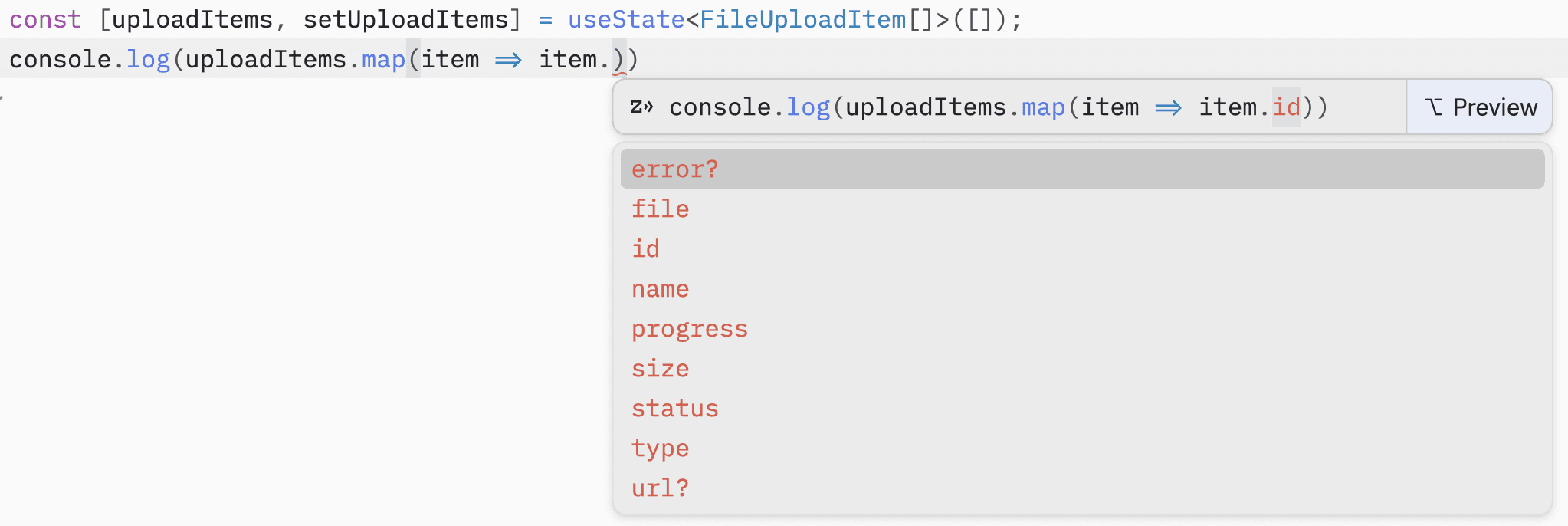
But for most developers, all of this is a black box: how does the editor know the types, and who is actually computing all those hints?
If you only treat TypeScript as “JavaScript that throws errors,” you end up missing a few important ideas: what tsserver is, and what the LSP is doing behind the scenes.
What Is tsserver?
Most people know tsc as the TypeScript compiler, but all the autocomplete, go-to-definition, and refactor suggestions you get in modern IDEs and editors are powered by tsserver.
It's a standalone Node process that embeds the TypeScript compiler and language services, and talks to the editor over a JSON-based protocol.
Put simply, tsserver does a few core things:
- Stays running in the background, keeping track of your project's structure and type information.
- Receives requests from the editor (for example, “give me completions at this position”).
- Returns the corresponding results (completion lists, quick info, diagnostics, and so on).
How tsserver Talks to Your Editor
Once you install the typescript package, you'll find the executable at node_modules/typescript/lib/tsserver.js. The editor usually starts it as a child process and then exchanges JSON messages over stdin/stdout.

Each request looks roughly like this:
- Request
- It has a sequence number
seq, a fixedtype: "request", acommandname, and matchingarguments. - For example, opening a file looks like this:
{
  "seq": 1,
  "type": "request",
  "command": "open",
  "arguments": { "file": "c:/path/to/file.ts" }
}
- It has a sequence number
- Responses and events
- They're prefixed with headers like
Content-Length, followed by a JSON payload containing the results, such as completions, quick info, or diagnostics.
- They're prefixed with headers like
The protocol's type definitions live in protocol.d.ts, and any client (editor or plugin) that speaks this protocol can turn UI actions (like pressing a shortcut or moving the cursor) into requests to tsserver.
In practice, things you do in the editor are translated into commands such as:
open/close: tell tsserver which files are currently being edited.change: notify tsserver that the text in a specific file/position has changed so it can update its in-memory view.completions,definition,rename,references: ask it to compute completions, go-to-definition, refactors, and more.
This is also why TypeScript errors show up immediately even if you haven't saved the file yet: tsserver is looking at the in-memory version, not the old version on disk.
How It Sees Your Project: Configured, External, and Inferred Projects
tsserver doesn't treat files as isolated units; it manages your codebase using the concept of “projects.”
The official docs describe three project types - see the “Project System” section: github
-
Configured Project
- A project that has a
tsconfig.json. - The config file defines the project root, which files are included, and which compiler options to use.
- This is the most common and recommended way to structure a TypeScript project.
- A project that has a
-
External Project
- Used by hosts that have their own project system format, like Visual Studio with
.csprojfiles.
- Used by hosts that have their own project system format, like Visual Studio with
-
Inferred Project
- When tsserver can't find any
tsconfig.jsonwhile walking up from a file's directory, it creates an inferred project for that file. - The inferred project includes the file itself plus anything reachable via triple slash references or module imports, and uses default compiler options (which the host can override).
next-env.d.ts /// <reference types="next" /> /// <reference types="next/image-types/global" /> import "./.next/dev/types/routes.d.ts";
- When tsserver can't find any
This project system is exactly why, in large codebases, you start to feel tsserver getting slower and more memory hungry. Splitting projects properly and narrowing the scope of each tsconfig often helps more than just complaining that “TypeScript is heavy.”
Who Actually Talks Directly to tsserver?
In the real world, there are two main integration patterns:
-
Speak the tsserver protocol directly
- The official TypeScript extension for VS Code works this way: it's a TypeScript client that talks directly to tsserver using its JSON protocol.
- Some editor plugins (early Sublime TypeScript plugins, Emacs Tide, etc.) also implement their own tsserver clients.
-
Wrap tsserver in an LSP server
- The community built
typescript-language-server, which wraps tsserver: it speaks the Language Server Protocol (LSP) on the outside and the tsserver protocol internally. - Neovim and other general-purpose LSP clients don't need to know tsserver's details; as long as they speak LSP, they can indirectly use TypeScript language services.
- The community built
What Is the LSP? A Protocol to Share Language Features Across Editors
If tsserver is the core of TypeScript's language smarts, then the Language Server Protocol (LSP) is the standard that lets those smarts be shared across many different editors and IDEs.
LSP uses JSON-RPC to define a standard set of requests and responses so that any editor that speaks this protocol can work with any language server that implements it.
The key goal is simple: decouple editors from language tools.
This gives you nice properties like:
- A single TypeScript language server can serve VS Code, Neovim, Zed, and more at the same time. zed
- A single editor that supports LSP can plug into TypeScript, Rust, Go, Python, and many other language servers.
What Does LSP Actually Send? From Keystrokes to IntelliSense
The LSP message format is built on top of JSON-RPC 2.0, and every operation is either a request, a response, or a notification. jsonrpc
Roughly speaking, the flow looks like this:
- Initialization
- The editor starts the language server and sends an
initializerequest describing its capabilities, like whether it supports code actions, rename, and so on. - The server responds with the set of features it supports, such as completion, hover, definition, diagnostics, etc.
- Synchronizing file content
- When you open a file, the editor sends
textDocument/didOpento the server with the full document content. - Every time you type or delete, the editor sends
textDocument/didChange, describing which range changed and what text was inserted. - When you close a file, it sends
textDocument/didClose, allowing the server to free up resources.
- Asking for “smart” features
- When you move the cursor or press a shortcut, the editor issues requests like:
textDocument/completion: ask for completion items.textDocument/definition: ask for go-to-definition.textDocument/hover: ask for hover information.textDocument/rename: ask for a rename refactor.
- The server uses its understanding of the language (AST, type system, project graph, etc.) to compute results and returns them as JSON for the editor to render.
- Background diagnostics and hints
- Even if you don't press any shortcuts, the server can push
textDocument/publishDiagnosticsnotifications to report errors and warnings. - The editor decides how to display these diagnostics: red squiggles, warning icons, Problems panel, and so on.
The beauty of this setup is:
- Editors don't need to understand the details of TypeScript, Rust, or Go; they just need to send LSP messages.
- Language servers don't care what the UI looks like; as long as there's an LSP client, they can power new tools.
How TypeScript Plugs Into LSP: typescript-language-server as the Bridge
As mentioned earlier, tsserver speaks its own JSON protocol, not LSP.
To make TypeScript reusable across LSP-based editors, the community created typescript-language-server, whose job is to translate between LSP and the tsserver protocol.
You can think of its role like this:
- On the outside: it behaves like a standard LSP language server, supporting methods like
initializeandtextDocument/*. - On the inside: it spawns a tsserver process and talks to it using the native tsserver commands like
completions,definition,rename, etc. - In the middle: it converts LSP requests into tsserver commands and maps tsserver responses back into LSP responses for the editor.
So in Neovim, Zed, or any other LSP-enabled editor, the TypeScript experience you see is still powered by the same tsserver — there's just an extra LSP adapter layer in between. zed
My editor is the client. TypeScript's language capabilities live in tsserver. LSP is the standardized protocol for talking to language servers, and typescript-language-server wraps tsserver as an LSP server so more tools can use it. github
With this mental model, when you tweak your toolchain, inspect language‑service logs, or debug weird behavior, you’re no longer just “mashing the restart button.” You can reason about whether the issue is in the LSP layer or in tsserver itself.
A Development Mindset: Writing TypeScript Is More Than “Making Types Pass”
Once you understand tsserver and LSP, it's worth shifting the focus back to how you think when writing TypeScript.
Earlier, when talking about projects, we touched on a key TypeScript idea: inference. tsserver uses your code and configuration to infer a graph of types across the project, and then powers refactors, navigation, and diagnostics based on that graph.
This has a strong implication: you really shouldn't keep redefining types that can be inferred. I'd even argue this is important enough to treat as a “top rule” — including when you ask AI to generate TypeScript.
Let's walk through a simple API response example. Suppose we fetch a list from an API:
interface Product {
  id: string;
  name: string;
  items: Product[];
}

const getProducts = async () => {
  const products = await fetch("https://api.example.com/products").then(
    (res) => res.json() as Promise<Product[]>
  );
  return products;
};
We still need to define a stable boundary type up front.
const Products = () => {
  const [products, setProducts] = useState<Product[]>([]);

  useEffect(() => {
    getProducts().then(setProducts);
  }, []);

  return (
    <div>
      {products.map((product, index, products) => (
        <div key={product.id}>{product.name}</div>
      ))}
    </div>
  );
};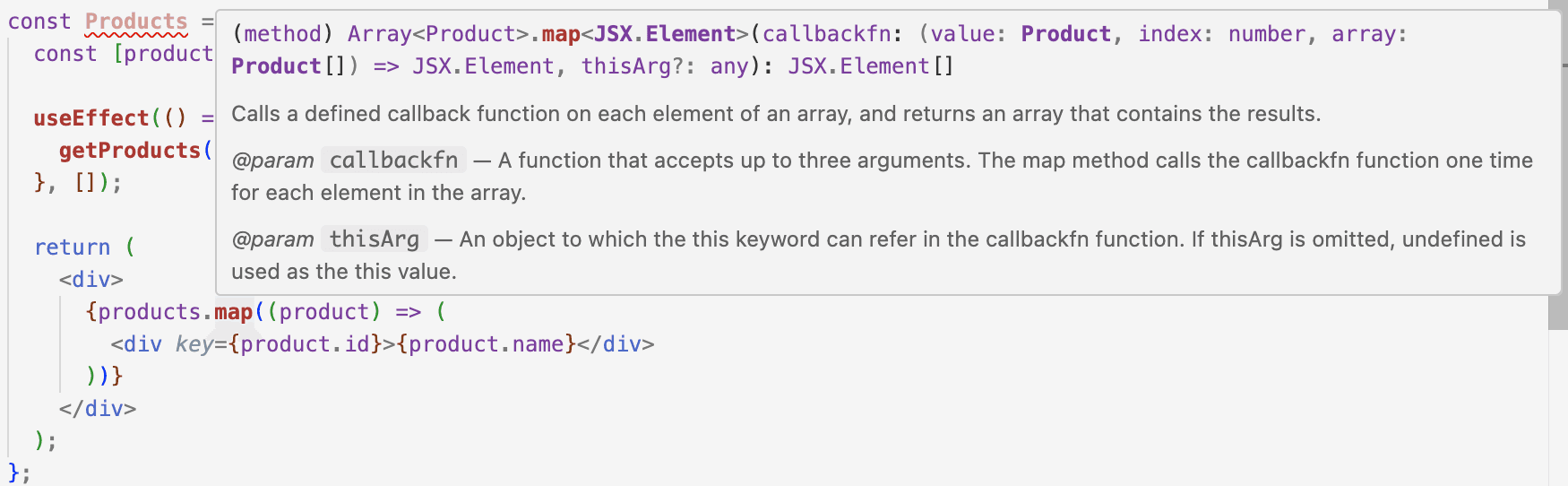
Here, we define a stable boundary type for the API call and for setState, so tsserver knows what products is. But once that's in place, the Array.map callback can simply rely on inference — TypeScript already knows the element type from products.
Now imagine we artificially redefine the type in the callback:
interface FakeProduct {
  id: string;
  items: FakeProduct[];
}

const Products = () => {
  const [products, setProducts] = useState<Product[]>([]);

  useEffect(() => {
    getProducts().then(setProducts);
  }, []);

  return (
    <div>
      {products.map((product: FakeProduct) => (
        <div key={product.id}>{product.name}</div>
      ))}
    </div>
  );
};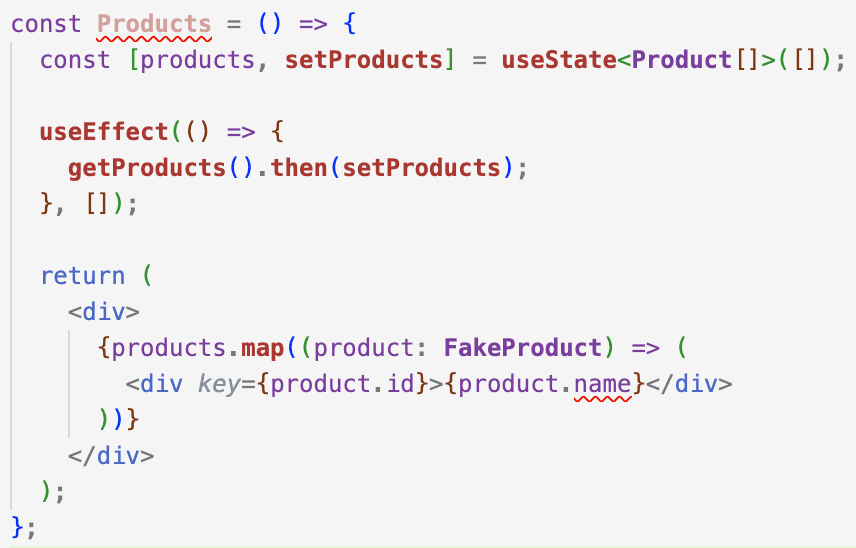
You'll immediately see an error: FakeProduct doesn't have a name field, so within the map callback, the compiler believes product is FakeProduct and blocks access to product.name.
I've seen this mistake a lot — both in real-world codebases and in AI-generated code: don't shadow or override types that can already be inferred from your existing source of truth.
A Few Concrete Suggestions
- Prioritize defining stable boundary types: API responses, domain models, and other canonical shapes your project depends on.
- Avoid sprinkling
anyeverywhere or overusingasassertions: both cut off inference and make tsserver's understanding (and your editor's hints) much less trustworthy. - Lean on features like
satisfiesandas constto make inference more precise and catch issues like misspelled string literals instead of silently letting them through.
Written by: Chia1104 CC BY-NC-SA 4.0