How to Build a Simple AI Chatbot: An Intro to SSE and How It Differs from WebSocket
This article explains why modern LLM / AI chat apps often choose SSE (Server‑Sent Events) over WebSocket, comparing protocol traits, browser support, scalability, and showing end‑to‑end code examples with Hono, Zustand, and the Vercel AI SDK. It’s written for frontend and full‑stack developers building streaming AI chat experiences and deciding when to use SSE or WebSocket in real‑world projects.
Since most of my recent projects are related to AI chat applications, I've been working a lot in this space and also referenced Vercel's AI SDK during development. In the process, I put together my own state management module for AI chat using Zustand, mainly to improve on the limitation that the AI SDK only provides a single useChat hook that can be used in just one component. With a standalone state management layer, multiple independent components can now share and interact with the same chat state more flexibly.
If you're interested, you can check it out here: @chiastack/features
In this post, though, I want to focus on why so many AI / LLM chat applications choose the SSE protocol instead of WebSocket, and what the respective use cases look like.
Differences in protocol characteristics
In the past, when building streaming features such as notification systems or real-time candlestick price updates for trading, we mostly relied on WebSocket to maintain long-lived bidirectional connections, mainly to avoid frequent short-interval polling. However, when all you really need is a long-lived but one-way stream, SSE can actually be a great fit.
SSE (Server-Sent Events)
- One-way only: Supports server -> client streaming; if the client needs to send data, it still does so via regular HTTP POST/PUT.
- Built on HTTP/1.x: Essentially an HTTP GET response that never ends, with
Content-Type: text/event-stream, and native browser support viaEventSource. - Naturally works through existing proxies / CDNs; headers / cookies / authentication all reuse the existing HTTP mechanisms.
WebSocket
- Bidirectional: Both client and server can send messages at any time, making it suitable for chat rooms, multi-user collaboration, gaming, and other truly high-frequency interactive scenarios.
- Requires an HTTP Upgrade handshake, then switches to a custom protocol, so it no longer behaves like standard HTTP afterward.
- Typically needs additional connection management, heartbeats, sharding, and scaling architecture around it.
When you use SSE for LLM chat, what you're really building is a long-lived HTTP connection that streams text one way from server to client, whereas WebSocket is a persistent bidirectional protocol. For most LLM chat scenarios, you primarily need server -> frontend streaming, so SSE aligns much better with the requirements, is simpler to implement, and integrates more easily with existing HTTP-based infrastructure.
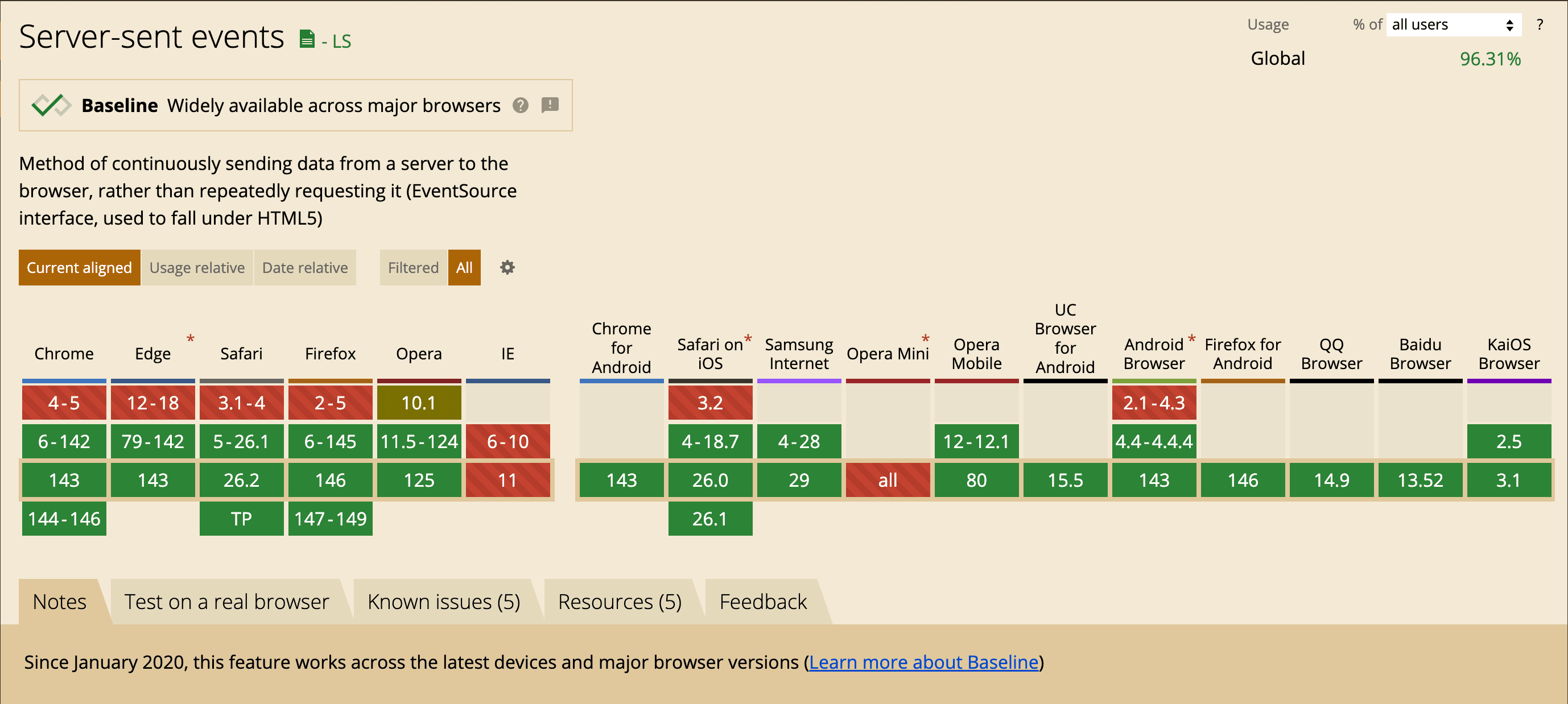
On top of that, SSE has been well supported in all major browsers for quite some time now.
Why LLM / AI chat often uses SSE
- Interaction pattern is mostly one-way
A typical LLM flow looks like this: the frontend sends a request (usually at a relatively low frequency), then the backend streams chunks of text back to the frontend until it's done. During that time, the frontend rarely needs to send more data over the same connection, so the bidirectional capability is largely wasted. SSE, by design, is the server continuously pushing text chunks to the client, which fits token streaming extremely well. This is why OpenAI and many other LLM providers adopt this pattern.
- Lower implementation and integration cost
On the backend, all you need to do is return a chunked HTTP response and write tokens as you generate them. Most web frameworks, reverse proxies, and API gateways support this pattern out of the box, so you don't need a separate WebSocket server.
On the frontend, you can use the native EventSource API, or use fetch with ReadableStream to process SSE-style streams manually. Either way, the developer experience is quite good for most web / SPA applications.
- Deployment and network friendliness
Because SSE is just standard HTTP, it plays nicely with Cloudflare, Nginx, API gateways, enterprise proxies, and so on. Observability, tracing, authentication, and quota control are much simpler, and many existing infrastructures (for example the Vercel AI SDK streaming protocol) use SSE as their standard format.
- Resource usage and scalability
AI chat workloads are usually characterized by lots of users, each sending relatively infrequent messages, followed by the server streaming back a large amount of text. In this read-heavy / write-sparse pattern, using SSE for one-way streaming plus HTTP load balancing tends to be easier to scale horizontally and manage than maintaining a fully bidirectional WebSocket connection for every client.
When you would pick WebSocket instead
-
Your application really needs high-frequency, fully bidirectional communication, such as:
- Real-time collaborative editing where everyone's actions are synced instantly to others.
- AI + human multi-party collaboration (for example multi-agent + multi-user chat rooms) where clients frequently send intermediate states or control signals back.
- The server needs to proactively push various kinds of events to the client even when there is no active API request, such as notifications, presence, typing indicators, etc., and you don't want to open separate HTTP connections for those.
-
You already have solid WebSocket infrastructure (for example in a game or real-time system), and AI is just one of the features on top of it. In that case, reusing WebSocket can be perfectly reasonable.
Minimal implementation
This section walks through a minimal end-to-end SSE example that you can actually run, to make the whole “server continuously pushes text events to the browser” flow crystal clear. The backend sends one event every 0.5 seconds and finally sends [DONE] to end the stream, while the frontend simply prints each message line by line on the page.
Backend: building an SSE endpoint with Hono
The following example uses Hono to create an /sse route that returns a ReadableStream, streaming data as it is produced.
import { Hono } from "hono";

const app = new Hono();

app.get("/sse", async (c) => {
  c.header("Content-Type", "text/event-stream");

  let id = 0;
  const MAX_ID = 5;

  const stream = new ReadableStream({
    start(controller) {
      controller.enqueue("data: stream started\n\n");
    },
    async pull(controller) {
      controller.enqueue(`id: ${id}\n`);
      controller.enqueue(`data: event #${id}\n\n`);

      id++;
      if (id >= MAX_ID) {
        controller.enqueue("data: [DONE]\n\n");
        controller.close();
        return;
      }
      return new Promise((r) => setTimeout(r, 500));
    },
    cancel() {
      console.log("stream cancelled");
    },
  });

  return c.body(stream);
});

export default {
  port: 3000,
  fetch: app.fetch,
};
Testing it with curl, you can see the raw SSE text output:
curl -X 'GET' \
  'http://localhost:3000/sse'
data: stream started

id: 0
data: event #0

id: 1
data: event #1

id: 2
data: event #2

id: 3
data: event #3

id: 4
data: event #4

data: [DONE]
Notice that each event consists of multiple lines and is separated by a blank line \n\n. Fields like data: and id: are part of the SSE specification's field format.
Frontend: using native EventSource
Here we use the browser's built-in EventSource to subscribe to the /sse endpoint we just created.
<!DOCTYPE html>
<html lang="en">

<head>
    <meta charset="UTF-8">
    <meta name="viewport" content="width=device-width, initial-scale=1.0">
    <title>Document</title>
</head>

<body>
    <pre id="log"></pre>

    <script>
        const logEl = document.getElementById('log');

        const appendLine = (line) => {
            logEl.textContent += (logEl.textContent ? '\n' : '') + line;
            logEl.scrollTop = logEl.scrollHeight;
        };

        const es = new EventSource('http://localhost:3000/sse');

        es.onopen = () => {
            appendLine('[connected]');
        };

        es.onmessage = (event) => {
            appendLine(event.data);
            if (event.data === '[DONE]') {
                es.close();
            }
        };

        es.onerror = (event) => {
            appendLine('[error]');
            console.error('EventSource error:', event);
            es.close();
        };
    </script>
</body>

</html>
The key advantage here is that you don't need to manually parse SSE framing; EventSource automatically maps data: lines into event.data and comes with built-in auto-reconnect, which is more than enough for many web projects.
Using fetch + ReadableStream to parse SSE manually
Sometimes using EventSource isn't convenient—for example, when you want to reuse the same fetch interceptors, run in a non-browser environment, or fully control the streaming behavior. In those cases, you can use fetch with ReadableStream and implement SSE parsing yourself.
Below is a minimal parser for the same /sse endpoint that supports id:, event:, and data:
<script>
    const logEl = document.getElementById('log');

    const appendLine = (line) => {
        logEl.textContent += (logEl.textContent ? '\n' : '') + line;
        logEl.scrollTop = logEl.scrollHeight;
    };

    // SSE client over fetch() (without EventSource)
    // Parses: id:, event:, data:, retry: and multi-line data
    async function fetchSSE(url, { signal } = {}) {
        const res = await fetch(url, {
            headers: {
                'Accept': 'text/event-stream',
                'Cache-Control': 'no-cache',
            },
            signal,
        });

        if (!res.ok) {
            throw new Error(`HTTP ${res.status} ${res.statusText}`);
        }
        if (!res.body) {
            throw new Error('ReadableStream not available on this response');
        }

        const reader = res.body.getReader();
        const decoder = new TextDecoder('utf-8');

        let buffer = '';
        let eventName = '';
        let eventId = '';
        let dataLines = [];

        const dispatch = () => {
            if (dataLines.length === 0) return { done: false };

            const data = dataLines.join('\n');
            const name = eventName || 'message';
            const idSuffix = eventId ? ` #${eventId}` : '';
            appendLine(`[${name}${idSuffix}] ${data}`);

            eventName = '';
            eventId = '';
            dataLines = [];

            if (data === '[DONE]') return { done: true };
            return { done: false };
        };

        while (true) {
            const { value, done } = await reader.read();
            if (done) break;

            buffer += decoder.decode(value, { stream: true });

            while (true) {
                const nl = buffer.indexOf('\n');
                if (nl === -1) break;

                let line = buffer.slice(0, nl);
                buffer = buffer.slice(nl + 1);
                if (line.endsWith('\r')) line = line.slice(0, -1);

                // blank line = end of event
                if (line === '') {
                    const r = dispatch();
                    if (r.done) return;
                    continue;
                }

                // comment line
                if (line.startsWith(':')) continue;

                const colon = line.indexOf(':');
                const field = colon === -1 ? line : line.slice(0, colon);
                let valueStr = colon === -1 ? '' : line.slice(colon + 1);
                if (valueStr.startsWith(' ')) valueStr = valueStr.slice(1);

                if (field === 'event') eventName = valueStr;
                else if (field === 'data') dataLines.push(valueStr);
                else if (field === 'id') eventId = valueStr;
            }
        }
    }

    const sseUrl = 'http://localhost:3000/sse';
    const controller = new AbortController();

    appendLine('[connecting]');
    fetchSSE(sseUrl, { signal: controller.signal })
        .then(() => appendLine('[closed]'))
        .catch((err) => {
            if (controller.signal.aborted) return;
            appendLine(`[error] ${err?.message || String(err)}`);
            console.error(err);
        });
</script>
While this version is more verbose, what you gain is a highly controllable parsing pipeline:
- You can reuse it in Node.js, Edge Runtime, or any environment where
EventSourceis not available. - You can customize error handling, timeouts, and retry strategies during streaming, and even stop the stream midway if needed.
In real-world LLM streaming scenarios, it's common to wrap a helper like fetchSSE into a small utility function, so both frontend and backend can share the exact same logic for “reading token streams” over SSE.
Written by: Chia1104 CC BY-NC-SA 4.0