How to Update RSC (React Server Components) State from the Client
In the Next.js App Router, Client Components can’t import Server Components directly, so passing live client state (like a search input) into an RSC requires a different pattern. This article shows a practical approach: sync state to the URL via search params, let the Server Component page read the latest value through the searchParams prop, and pass it down to your RSC for data fetching and rendering. It also covers the recommended Next.js APIs (useSearchParams, useRouter) and notes how nuqs can make query-string state management cleaner and type-safe.
Recently, most of the projects I've been working on involve using Next.js, and the interaction between RSC and regular Client Components has become more and more frequent.
One common scenario is when I have some client-side state that updates dynamically, such as a user's search input, and that state needs to be passed into an RSC as props, How can we do that?
What is a React Server Component (RSC)?
React Server Components (RSC) are React components that run on the server, designed to reduce the amount of JavaScript sent to the browser so pages load faster and the overall experience improves
- RSC lets part of your React tree run only on the server, and those components won't be bundled into the browser, so they never end up in the client bundle.
- These Server Components render the UI ahead of time and produce a special data format (the RSC payload), which is then sent to the browser and turned into HTML.
When using the App Router in Next.js (app/), page and layout are Server Components by default, and only files marked with "use client" are treated as Client Components.
Here's a quick note about another directive — "use server". This directive marks a module or function as a Server Functions that must be executed on the server at build or request time, not as an RSC itself. I've seen people treat it as a way to import RSCs but this is incorrect.
If you put this directive inside a component and call that function directly in the render phase, you will trigger an infinite loop.
"use server";

const DDoSMyself = async () => {
  await new Promise((resolve) => setTimeout(resolve, 1000));
  return <p>I'm a Server Function</p>
}import DDoSMySelf from "./DDoSMySelf";
const SharedComponent = () => {
return <div>
I'm a Shared Component
<DDoSMySelf /> /* [!code --] */
</div>
}Rules for using RSC
Because Server Components interact heavily with server-side logic, there are some explicit rules about how to use them. To prevent components or functions from being imported in the wrong place, you can use two packages from the React team: server-only and client-only.
server-only: Used in frameworks like Next.js to ensure specific code only runs on the server.If it is accidentally imported into client-side code, it will throw a build-time error.client-only: Used in frameworks like Next.js to ensure specific code only runs on the client. If it is accidentally imported into server-side code, it will throw a build-time error.
What Server Components cannot do
- They cannot use React hooks that manage local state or side effects: hooks like
useState,useReducer, anduseEffectare not allowed in RSCs. - They cannot use browser APIs: things like
window,document, orlocalStorage, or anything else that exists only in the browser, are off‑limits. - They cannot attach event handlers directly: using
onClick,onChange, and similar props in a Server Component is not allowed, and that part of the UI must be split into a Client Component.
What Server Components can do
- They can be asynchronous components; for example, during render they can directly
awaitdatabase queries or call internal/external APIs, making them ideal for data fetching and composing UI. - They can safely access server-only resources like the file system, secret keys, environment variables, and backend SDKs, none of which will ever be sent to the browser.
- They can pass serializable props to Client Components, such as strings, numbers, objects, arrays, and JSON, but they cannot pass functions, class instances,
Dateobjects, or any other non-serializable values.
Import rules between Client and Server
- Client Components can only import other Client Components; they cannot directly import Server Components, or else that file will be treated as part of the client bundle.
- Conversely, Server Components can import Client Components and wrap them in JSX, passing data down as props, creating an outer server / inner client structure.
- Similarly, if you want to use a Server Component from a Client Component, you must wrap the Server Component as
childreninside a Server Component boundary, rather than importing it directly into the client file.
Updating RSC state
We just went over some usage rules for RSCs, including the fact that Client Components cannot import Server Components directly.
So if we have some client-side state that needs to be synced back into a Server Component, how can we do it?
For example, suppose we have a search input whose state is used to query data from the database:
"use client";

import { useState } from "react";

export const SearchAction = () => {
  const [search, setSearch] = useState("");

  return (
    <>
      <input value={search} onChange={(e) => setSearch(e.target.value)} />
    </>
  );
};import "server-only";
const sql = async (args: TemplateStringsArray, ...values: any[]) => {
const query = args.map((arg, i) => arg + (values[i] || "")).join("");
await new Promise((resolve) => setTimeout(resolve, 1000));
return [];
};
export const ServerDataGrid = async ({ search }: { search: string }) => {
const result = await sql`SELECT * FROM users WHERE name LIKE '%${search}%'`;
return (
<table>
{result.map((row) => (
<tr key={row.id}>{row.name}</tr>
))}
</table>
);
};According to the rules mentioned earlier, we cannot import ServerDataGrid directly inside SearchAction.
"use client";

import { useState } from "react";
import { ServerDataGrid } from "./ServerDataGrid";

export const SearchAction = () => {
  const [search, setSearch] = useState("");

  return (
    <>
      <input value={search} onChange={(e) => setSearch(e.target.value)} />
      <ServerDataGrid search={search} /> /* [!code --] */
    </>
  );
};
In this case, React will throw an error through server-only:
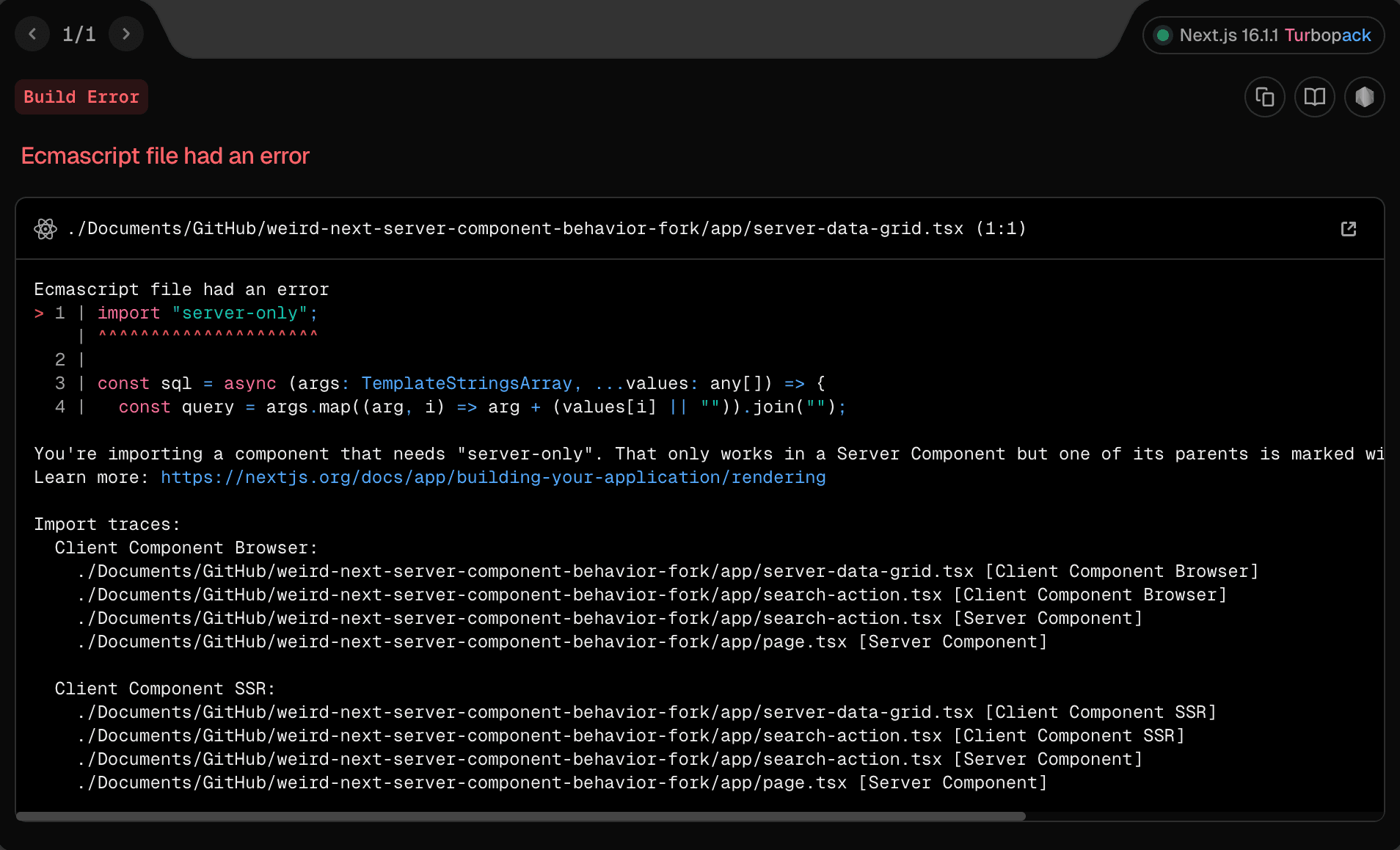
You're importing a component that needs "server-only". That only works in a Server Component but one of its parents is marked with "use client", so it's a Client Component.
Learn more: https://nextjs.org/docs/app/building-your-application/rendering
Updating state via search params
We mentioned earlier that RSCs are rendered on the server and then streamed to the client as an RSC payload, which means that to get an RSC you always go through some form of fetch request under the hood.
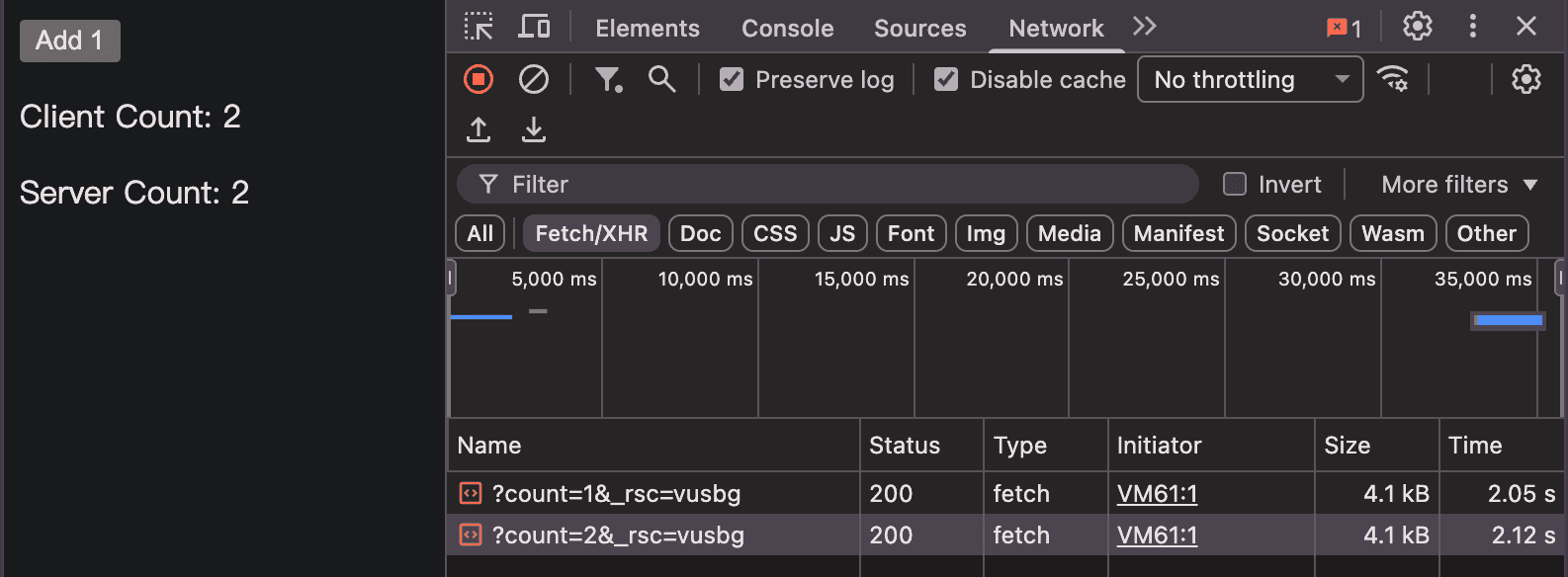
So React Server Components also need some kind of state that comes in with the request. As long as the server can receive incoming requests from the client, it can read that state, such as Search Params, or headers and cookies from next/headers.
Let’s refactor our example:
"use client";

import { useSearchParams } from "next/navigation";
import { useRouter } from "next/navigation";

export const SearchAction = ({ children }: { children: React.ReactNode }) => {
  const searchParams = useSearchParams();
  const router = useRouter();

  const handleSearch = (e: React.ChangeEvent<HTMLInputElement>) => {
    const params = new URLSearchParams(searchParams.toString());
    params.set("search", e.target.value);
    router.push(`?${params.toString()}`);
  };

  return (
    <>
      <input value={searchParams.get("search") || ""} onChange={handleSearch} />
      {children}
    </>
  );
};
Now we move the import of the Server Component to the outermost Server Component:
import { SearchAction } from "./search-action";
import { ServerDataGrid } from "./server-data-grid";
import { Suspense } from "react";

export default async function Page({ searchParams }: { searchParams: Promise<{ [key: string]: string }> }) {
  const { search } = await searchParams;
  return (
    <SearchAction>
      <Suspense fallback={<div>Loading server data-grid...</div>}>
        <ServerDataGrid search={search} />
      </Suspense>
    </SearchAction>
  );
}
This way, the RSC can correctly receive the state derived from the client.
For working with search params, I personally recommend using nuqs, a library dedicated to managing state in Search Params. It supports validation and transformation through parsers and works both on the client side and the server side

Written by: Chia1104 CC BY-NC-SA 4.0