Mastering CORS in Frontend Development: Causes, Explanations, and Practical Solutions
Tired of getting blocked by CORS errors? This guide explains what Cross-Origin Resource Sharing (CORS) really is, why it happens, and how to fix it effectively with backend configurations and frontend proxy setups — including real examples using Hono, Vite, and Next.js.
When doing front-end development, most of us have probably encountered the same issue — CORS. It's also a very common interview question: “What should you do when you run into a CORS error, and how do you solve it?”

'https://example.com' from origin 'http://localhost:3000' has been blocked by CORS policy: Response to preflight request doesn't pass access control check: No 'Access-Control-Allow-Origin' header is present on the requested resource. If an opaque response serves your needs, set the request's mode to 'no-cors' to fetch the resource with CORS disabled.We've all seen this error message before. Some developers might take it literally and set mode="no-cors" on the front end — but that's wrong!!
Setting the mode of fetch to no-cors simply prevents the browser from sending a preflight request, and the response becomes opaque, meaning its headers and body cannot be accessed by JavaScript.
const opaqueResponse = await fetch(url, {
    mode: "no-cors",
  })
What is CORS?
CORS (Cross-Origin Resource Sharing) is a browser security mechanism that restricts web pages from making requests to a different origin. This means CORS issues occur only in browser environments.
Normally, before each HTTP request, the browser sends a preflight request to check which kinds of access the API allows.

This preflight request uses the OPTIONS method. You might notice it responds with something like Access-Control-Allow-Origin: http://localhost:3001, which means the API only allows requests from that specific origin. If the client's origin isn't http://localhost:3001, the browser will throw a CORS error.
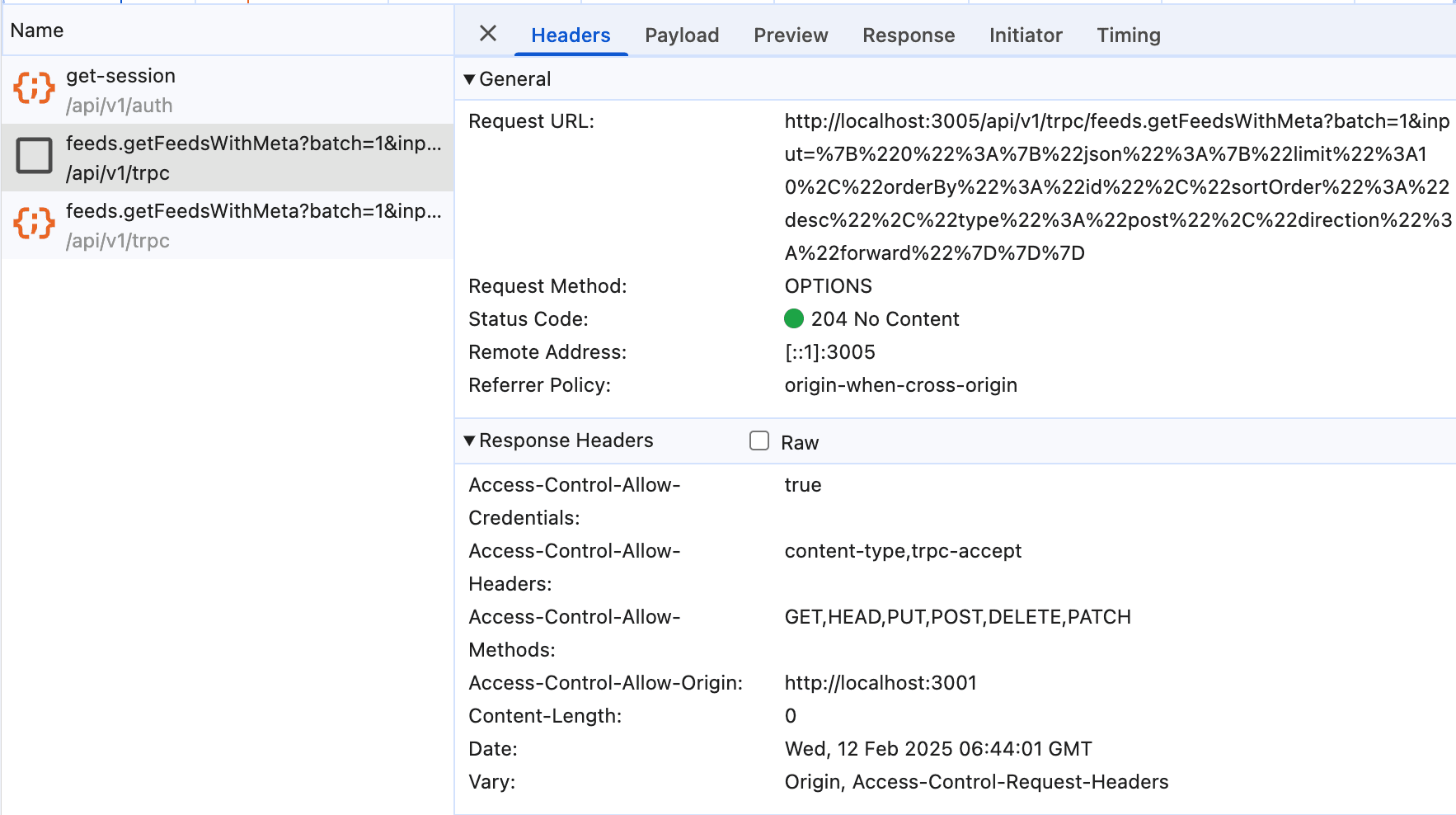
The configuration (such as Access-Control-Allow-Origin) must be handled by the backend API.
Allow
Access-Control-Allow-Credentials: Whether the client is allowed to sendcredentials. MDNAccess-Control-Allow-Headers: Lists which custom requestheadersthe client can send, e.g.X-Custom-HeaderMDNAccess-Control-Allow-Methods: Lists the HTTP methods the client can use, such asGET, POST, PATCH, PUT, DELETEMDNAccess-Control-Allow-Origin: Specifies which origins are allowed to make requests. MDN
Expose
Access-Control-Expose-Headers: Lists the headers that the server allows the client to access, such asRetry-AfterMDN
How to Fix It
Going back to the question “How do you solve a CORS issue?”, the answer is simple — configure CORS on the backend.
Setting CORS in the Backend
Let's use Hono as an example:
import { Hono } from "hono";

const app = new Hono();

/**
 * Set up CORS for the `/` route
 */
app.options("/", (c) => {
  c.header("Access-Control-Allow-Origin", "*");
  c.header("Access-Control-Allow-Methods", "GET, POST, PUT, DELETE");
  c.header("Access-Control-Allow-Headers", "Content-Type");
  c.status(204);

  return c.body(null);
});

app.get("/", (c) => c.text("Hono!"));

export default app;
Note that each route must have a corresponding OPTIONS handler. Fortunately, many frameworks now provide middleware to configure CORS globally, so you don't need to repeat this for every route.
import { cors } from "hono/cors";
import { env } from "@/env";

const getCORSAllowedOrigin = (): string[] | string => {
  if (!env.CORS_ALLOWED_ORIGIN) return "*";
  return (
    env.CORS_ALLOWED_ORIGIN?.split(",").map((item) => {
      return item.trim();
    }) ?? "*"
  );
};

app.use(
    cors({
      origin: getCORSAllowedOrigin(),
      credentials: true,
      // default settings
    })
  );
Frontend Proxy
Sometimes, during local development, backend servers may not allow localhost for security reasons. In those cases, you can use a proxy server to bypass the restriction, since CORS doesn't apply to server-to-server requests.
Vite
Vite is one of the most popular full-stack development tools today. Its vite.config.mts supports proxying:
/// <reference types="vitest" />
import { defineConfig, loadEnv, type ConfigEnv } from 'vite';
import https from 'https';

export default ({ mode }: ConfigEnv) => {
	process.env = { ...process.env, ...loadEnv(mode, process.cwd()) };

	return defineConfig({
		server: {
			proxy: {
				'/proxy-api': {
					target: process.env.VITE_APP_APIBASE,
					changeOrigin: true,
					rewrite: path => path.replace(/^\/proxy-api/, ''),
					agent: new https.Agent(),
				},
			},
		},
	});
};
Then, on the front end, simply prefix your fetch requests with /proxy-api.
Next.js
Next.js is a React full-stack framework that lets you implement your own APIs, but you can also configure a built-in proxy directly in your next.config.ts:
const nextConfig: NextConfig = {
	rewrites: async () => [
		{
			source: '/proxy-api/:path*',
			destination: `${env.NEXT_PUBLIC_APP_AIP_HOST}/:path*`,
		},
	],
};

export default nextConfig;Written by: Chia1104 CC BY-NC-SA 4.0