如何實作一個簡單的 AI Chat Bot,淺談什麼是 SSE,跟 WebSocket 差在哪
這篇文章從實務開發者觀點,深入解析為何現代 LLM/AI 聊天應用多半選擇 SSE(Server‑Sent Events)而不是 WebSocket,帶你比較兩種協議在雙向溝通、瀏覽器支援、部署與擴充性上的差異,同時示範如何用 Hono、Zustand 與 Vercel AI SDK 打造可串流的 AI 聊天功能。文中包含前後端完整程式碼範例與實作細節,適合正在開發 AI 聊天產品、考慮串流回應架構,或想釐清 SSE 與 WebSocket 適用場景的前端與全端工程師。
由於最近做的專案多跟 AI 聊天應用相關,開發過程中也參考了 Vercel 的 AI SDK,並再用 Zustand 自行整理了一個 AI 聊天的狀態管理模組,主要針對 AI SDK 只有一個 useChat 的 hook 並只能在單一元件做使用的問題來做優化,透過獨立的狀態管理模式讓各自獨立的元件也可以一起使用。
有興趣的可以參考看看 @chiastack/features
不過這次的主要要講這些 AI 聊天應用為何都用 SSE 這個協議而非 WebSocket,並且各自的應用又在哪。
協議特性差異
過去在做串流服務,例如通知系統或交易的 K 線實時資料更新,多半都是用 WebSocket 這協議來保持長時間的雙向連線,主要避免短時間的不斷 polling,但有時我們只要單向但又是長時間的連線的話 SSE 或許是不錯的選擇。
SSE (Server-Sent Events)
- 單向:只支援 server -> client,client 要送東西還是用普通 HTTP POST/PUT。
- 基於 HTTP/1.x:本質就是一個不結束的 GET 回應,
content-type text/event-stream,瀏覽器用EventSource原生支援。 - 天然穿越各種 proxy / CDN,header / cookie / 認證模式都沿用既有 HTTP。
WebSocket
- 雙向:client、server 任意時間互傳訊息,適合 chat room、多人協作、遊戲等真正雙向高頻互動。
- 需 HTTP Upgrade 握手,進入自訂協議,後面就不是標準 HTTP 了。
- 需要額外的連線管理、心跳、分流與擴充架構設計。
用 SSE 做 LLM 聊天,本質上是 單向文字串流的 HTTP 長連線,而 WebSocket 是 雙向協議的持久連線。大多數 LLM 只需要伺服器 -> 前端的單向串流,因此 SSE 更符合需求、實作更簡單,也比較好與既有 HTTP / 基礎設施整合。
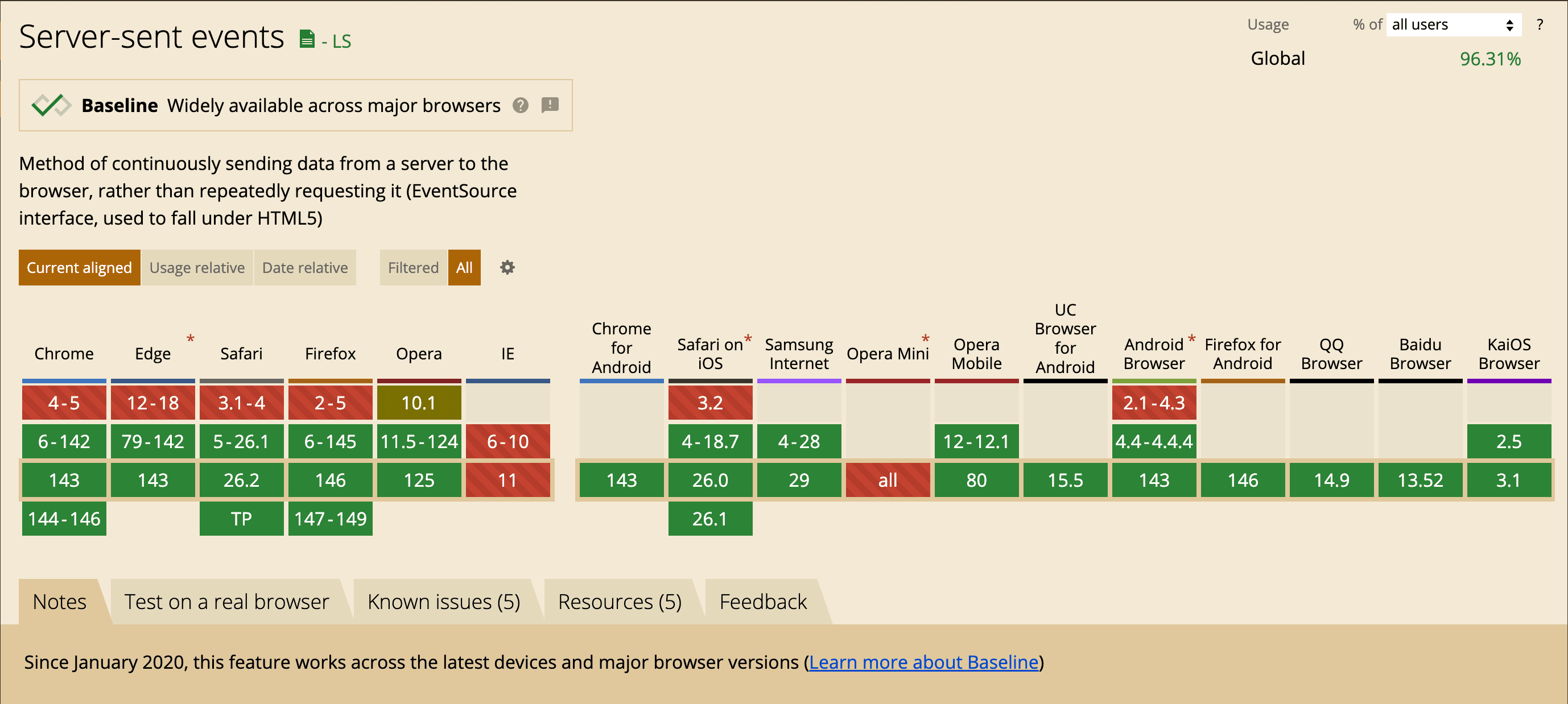
並且 SSE 在目前的主流瀏覽器也都支援好一段時間了
為何 LLM / AI 聊天常用 SSE
- 交互模式偏單向
LLM 典型流程:前端送一個 request(多半頻率不高),接著後端 連續推字串 到前端,直到完成,在這段時間內前端很少需要主動再對同一條連線發訊息,所以雙向能力浪費掉。 SSE 剛好就是 伺服器持續推文字片段到前端,對 token streaming 非常貼合(OpenAI、許多 LLM provider 都採這種 pattern)。
- 實作與整合成本低
後端只要回傳一個 chunked 的 HTTP response,邊產生 token 邊 write,一般 Web framework / reverse proxy / API gateway 幾乎都直接支援,無需額外 WebSocket server。
前端直接用 EventSource 或用 fetch 跟 ReadableStream 讀取 SSE 風格的資料流,對大部分 web / SPA 來說開發體驗很好。
- 部署與網路環境友善
因為是標準 HTTP,穿 Cloudflare / Nginx / API Gateway / 企業 proxy、做觀測、trace、auth、quota 都相對簡單,很多現有基礎設施(例如 Vercel AI SDK 的 stream protocol)直接以 SSE 當標準格式。
- 資源與擴充性
AI 聊天通常是 大量用戶、每人偶爾打一則訊息,然後server 大量輸出文字。在這種 read-heavy / write-sparse pattern 下,用 SSE 單向推送、配合 HTTP 負載平衡擴展,比為每個 client 維護雙向 WebSocket 更易於水平擴充和管理。
什麼時候會想選 WebSocket
-
你的應用需要真正雙向、高頻互動:
- 多人協同編輯(每個人的操作即時同步到其他人)。
- AI + human 多方協作(例如多 agent + 多人聊天室)且 client 會頻繁回傳中途狀態或控制訊號。
- 需要 server 主動在 沒有 API request 的情況下推多種事件給 client(通知、presence、typing indicators 等),而不想再開別的 HTTP。
-
你已經有一套 WebSocket 基礎設施(例如遊戲 / 即時系統),AI 只是其中一個子功能,那沿用 WebSocket 也很合理。
最小實作
這一節示範一個從後端到前端都能跑起來的最小 SSE 範例,讓整個「伺服器持續推送文字事件到瀏覽器」的流程一目了然。後端會每隔 0.5 秒送一個事件,最後送出 [DONE] 結束串流,前端則負責把這些訊息逐行顯示在畫面上。
後端:用 Hono 建立 SSE endpoint
下面的範例使用 Hono 建一個 /sse 路由,回傳一個 ReadableStream,邊產生資料邊寫進 response。
import { Hono } from "hono";

const app = new Hono();

app.get("/sse", async (c) => {
  c.header("Content-Type", "text/event-stream");

  let id = 0;
  const MAX_ID = 5;

  const stream = new ReadableStream({
    start(controller) {
      controller.enqueue("data: stream started\n\n");
    },
    async pull(controller) {
      controller.enqueue(`id: ${id}\n`);
      controller.enqueue(`data: event #${id}\n\n`);

      id++;
      if (id >= MAX_ID) {
        controller.enqueue("data: [DONE]\n\n");
        controller.close();
        return;
      }
      return new Promise((r) => setTimeout(r, 500));
    },
    cancel() {
      console.log("stream cancelled");
    },
  });

  return c.body(stream);
});

export default {
  port: 3000,
  fetch: app.fetch,
};
用 curl 測試,可以看到 SSE 的原始文字長這樣:
curl -X 'GET' \
  'http://localhost:3000/sse'
data: stream started

id: 0
data: event #0

id: 1
data: event #1

id: 2
data: event #2

id: 3
data: event #3

id: 4
data: event #4

data: [DONE]
可以注意到每一個事件是由多行組成,最後用空白行 \n\n 分隔,data: 跟 id: 都是 SSE 規範中的欄位格式。
前端:用原生 EventSource
這裡直接用瀏覽器內建的 EventSource 來訂閱剛剛的 /sse。
<!DOCTYPE html>
<html lang="en">

<head>
    <meta charset="UTF-8">
    <meta name="viewport" content="width=device-width, initial-scale=1.0">
    <title>Document</title>
</head>

<body>
    <pre id="log"></pre>

    <script>
        const logEl = document.getElementById('log');

        const appendLine = (line) => {
            logEl.textContent += (logEl.textContent ? '\n' : '') + line;
            logEl.scrollTop = logEl.scrollHeight;
        };

        const es = new EventSource('http://localhost:3000/sse');

        es.onopen = () => {
            appendLine('[connected]');
        };

        es.onmessage = (event) => {
            appendLine(event.data);
            if (event.data === '[DONE]') {
                es.close();
            }
        };

        es.onerror = (event) => {
            appendLine('[error]');
            console.error('EventSource error:', event);
            es.close();
        };
    </script>
</body>

</html>
這個版本的重點在於:不需要自己解析 SSE 格式,EventSource 會幫你把 data: 轉成 event.data,而且自帶自動重連機制,對一般 web 專案來說已經很夠用。
用 fetch 跟 ReadableStream 手動解析 SSE
有時候不方便使用 EventSource(例如想共用同一套 fetch 攔截器、需要在非瀏覽器環境、或要完全掌控串流處理方式),可以改用 fetch 搭配 ReadableStream,手動解析 SSE 格式。
下面是對同一個 /sse endpoint 的最小解析器,支援 id:、event:、data:
<script>
    const logEl = document.getElementById('log');

    const appendLine = (line) => {
        logEl.textContent += (logEl.textContent ? '\n' : '') + line;
        logEl.scrollTop = logEl.scrollHeight;
    };

    // SSE client over fetch() (without EventSource)
    // Parses: id:, event:, data:, retry: and multi-line data
    async function fetchSSE(url, { signal } = {}) {
        const res = await fetch(url, {
            headers: {
                'Accept': 'text/event-stream',
                'Cache-Control': 'no-cache',
            },
            signal,
        });

        if (!res.ok) {
            throw new Error(`HTTP ${res.status} ${res.statusText}`);
        }
        if (!res.body) {
            throw new Error('ReadableStream not available on this response');
        }

        const reader = res.body.getReader();
        const decoder = new TextDecoder('utf-8');

        let buffer = '';
        let eventName = '';
        let eventId = '';
        let dataLines = [];

        const dispatch = () => {
            if (dataLines.length === 0) return { done: false };

            const data = dataLines.join('\n');
            const name = eventName || 'message';
            const idSuffix = eventId ? ` #${eventId}` : '';
            appendLine(`[${name}${idSuffix}] ${data}`);

            eventName = '';
            eventId = '';
            dataLines = [];

            if (data === '[DONE]') return { done: true };
            return { done: false };
        };

        while (true) {
            const { value, done } = await reader.read();
            if (done) break;

            buffer += decoder.decode(value, { stream: true });

            while (true) {
                const nl = buffer.indexOf('\n');
                if (nl === -1) break;

                let line = buffer.slice(0, nl);
                buffer = buffer.slice(nl + 1);
                if (line.endsWith('\r')) line = line.slice(0, -1);

                // blank line = end of event
                if (line === '') {
                    const r = dispatch();
                    if (r.done) return;
                    continue;
                }

                // comment line
                if (line.startsWith(':')) continue;

                const colon = line.indexOf(':');
                const field = colon === -1 ? line : line.slice(0, colon);
                let valueStr = colon === -1 ? '' : line.slice(colon + 1);
                if (valueStr.startsWith(' ')) valueStr = valueStr.slice(1);

                if (field === 'event') eventName = valueStr;
                else if (field === 'data') dataLines.push(valueStr);
                else if (field === 'id') eventId = valueStr;
            }
        }
    }

    const sseUrl = 'http://localhost:3000/sse';
    const controller = new AbortController();

    appendLine('[connecting]');
    fetchSSE(sseUrl, { signal: controller.signal })
        .then(() => appendLine('[closed]'))
        .catch((err) => {
            if (controller.signal.aborted) return;
            appendLine(`[error] ${err?.message || String(err)}`);
            console.error(err);
        });
</script>
這個版本雖然程式碼比較長,但換來的是高度可控的解析流程:
可在 Node.js、Edge Runtime 等無 EventSource 的環境重複利用。
可以在讀取過程中,自訂錯誤處理、超時、重試策略,甚至在解析中途就中止串流。
實務上,在 LLM 串流場景中,把這種 fetchSSE 包裝成一個小工具函式,就能很容易在前端、後端共用同一套「讀取 token 串流」的邏輯。
Written by: Chia1104 CC BY-NC-SA 4.0